

EACH OUTPUT REMEMBERS
Every output keeps its own sound
Headphones and speakers, each tuned its own way
FluidEQ
Free & open source
Get more from your headphones with correction profiles, precise EQ and powerful DSP. Share audio between computers and play through multiple outputs at once—each with its own EQ, DSP rack and sound profile that you can adjust independently.
Play your music, sing karaoke, and bring your desktop to life with music-reactive visualizers and animated wallpapers. All in one app.
The complete app is free and open source. No subscription. No account needed to get started. See the visualizers
FluidEQ in motion
Watch the current demo first, then explore every workspace in order.
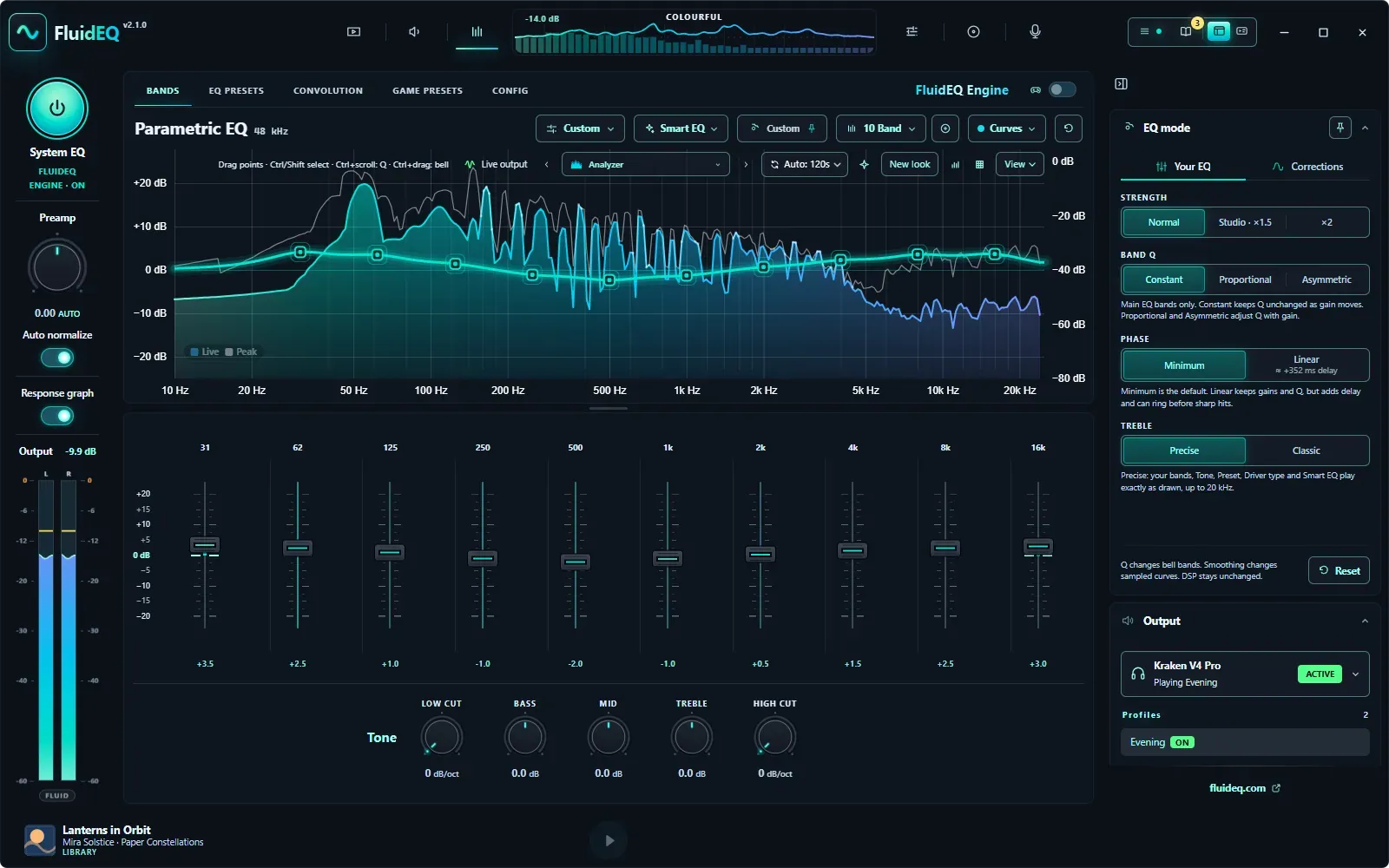
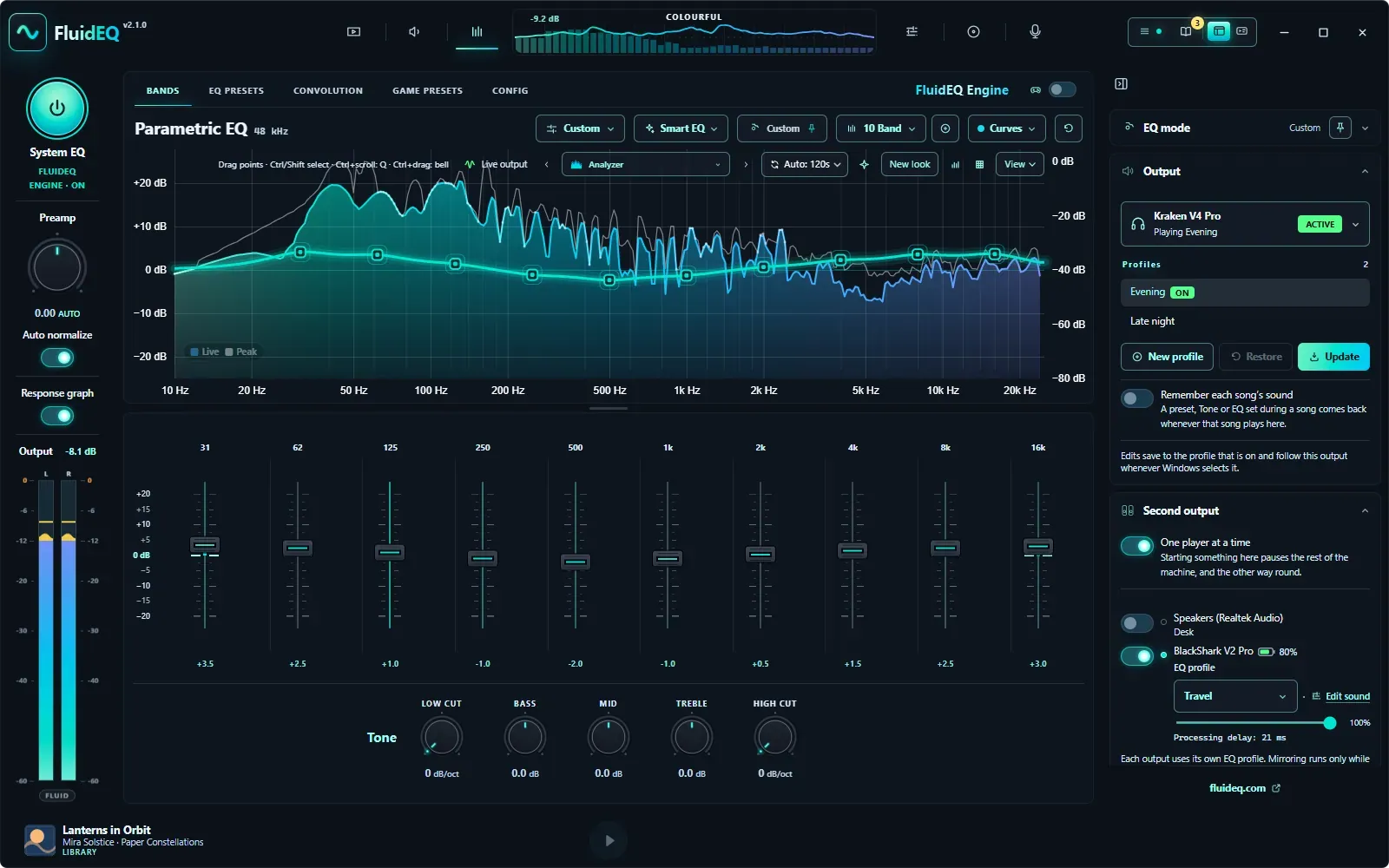
Parametric bands and live response
Up to 128 bands per output, each with its own filter, over the live spectrum and the combined response.
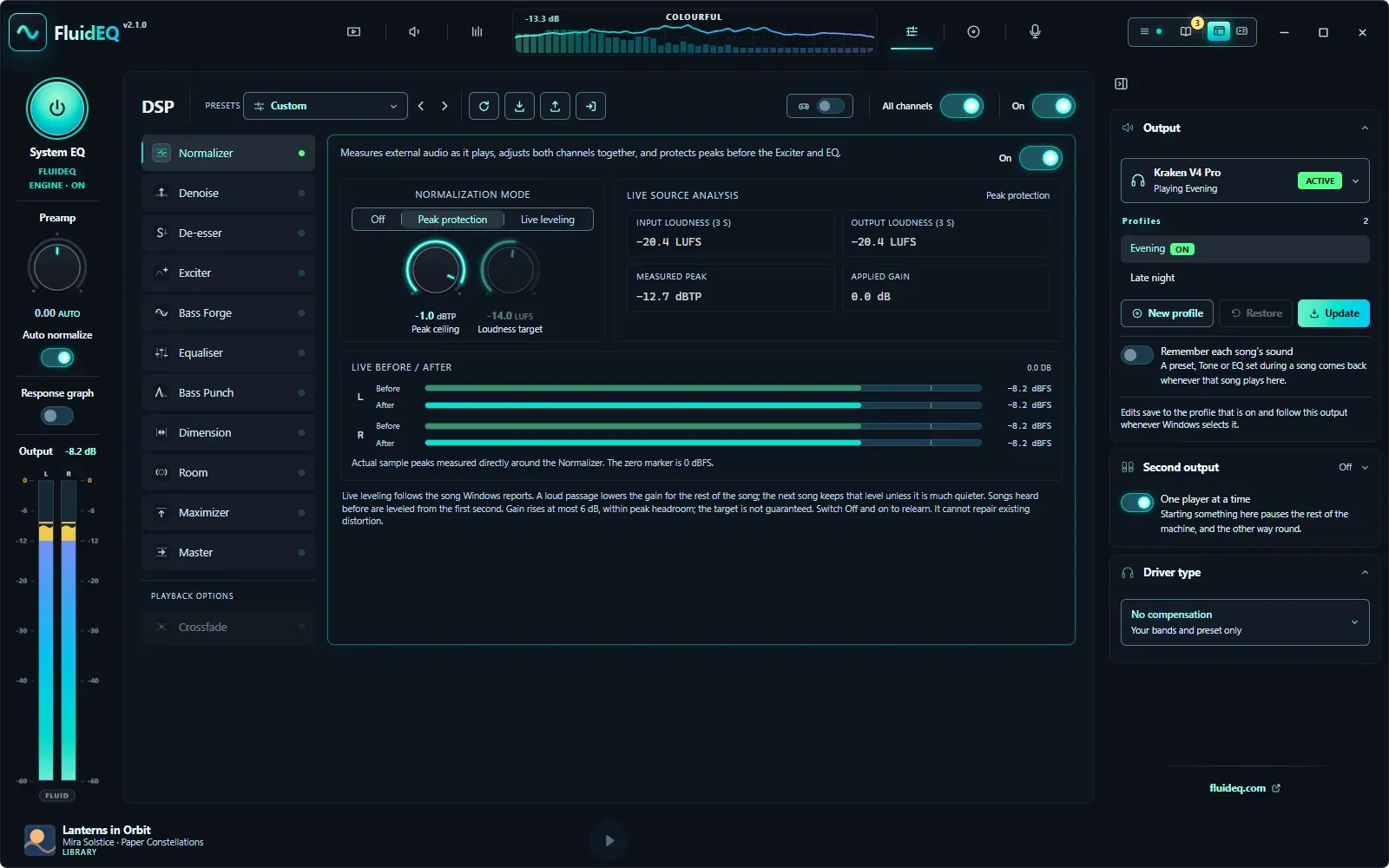
The DSP rack, stage by stage
Each stage from Normalizer to Master opens to its own controls — here the Normalizer, with input and output readings and before/after meters.
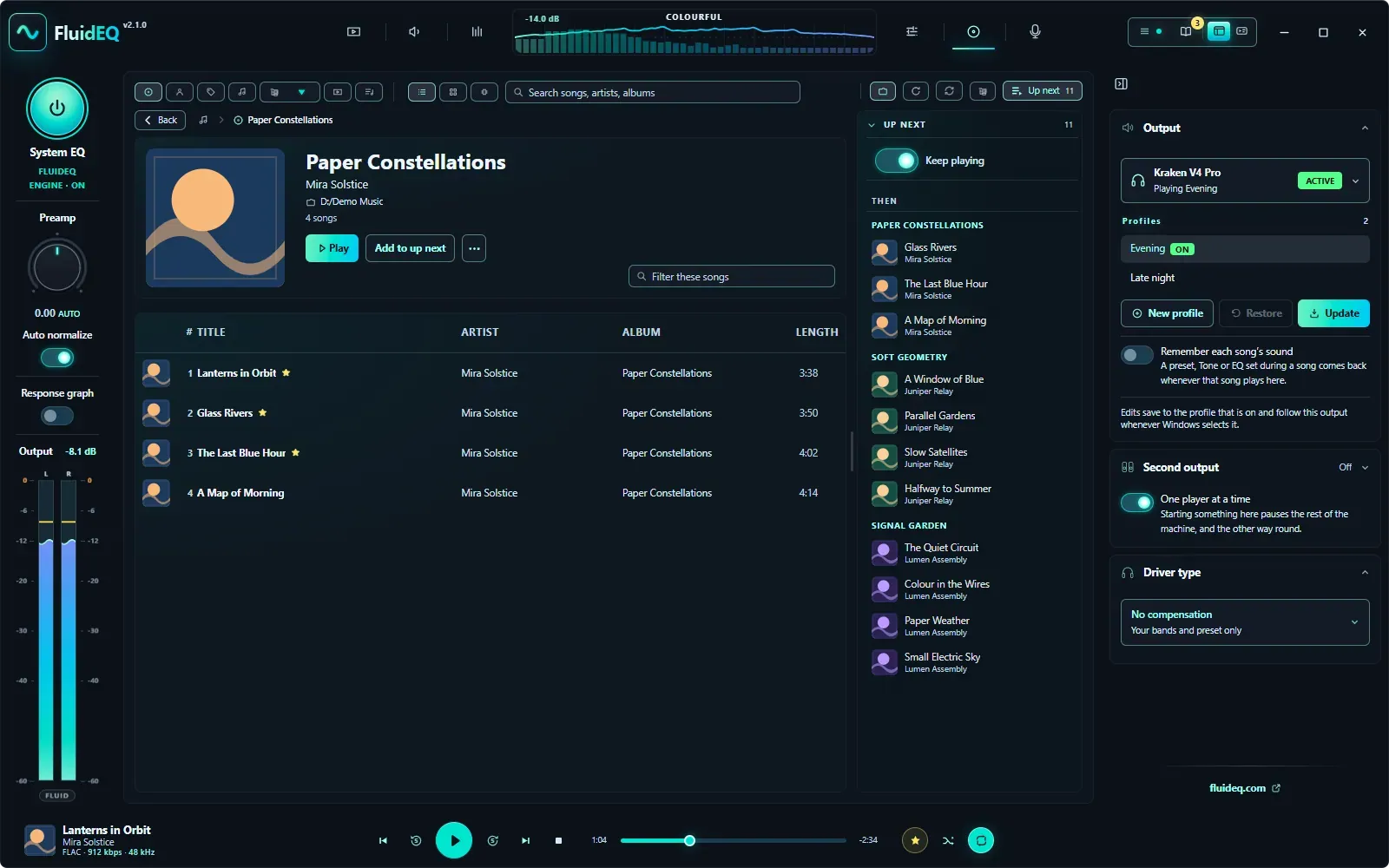
Your music, by album
Open an album to its songs, and keep Up Next in view while it plays.
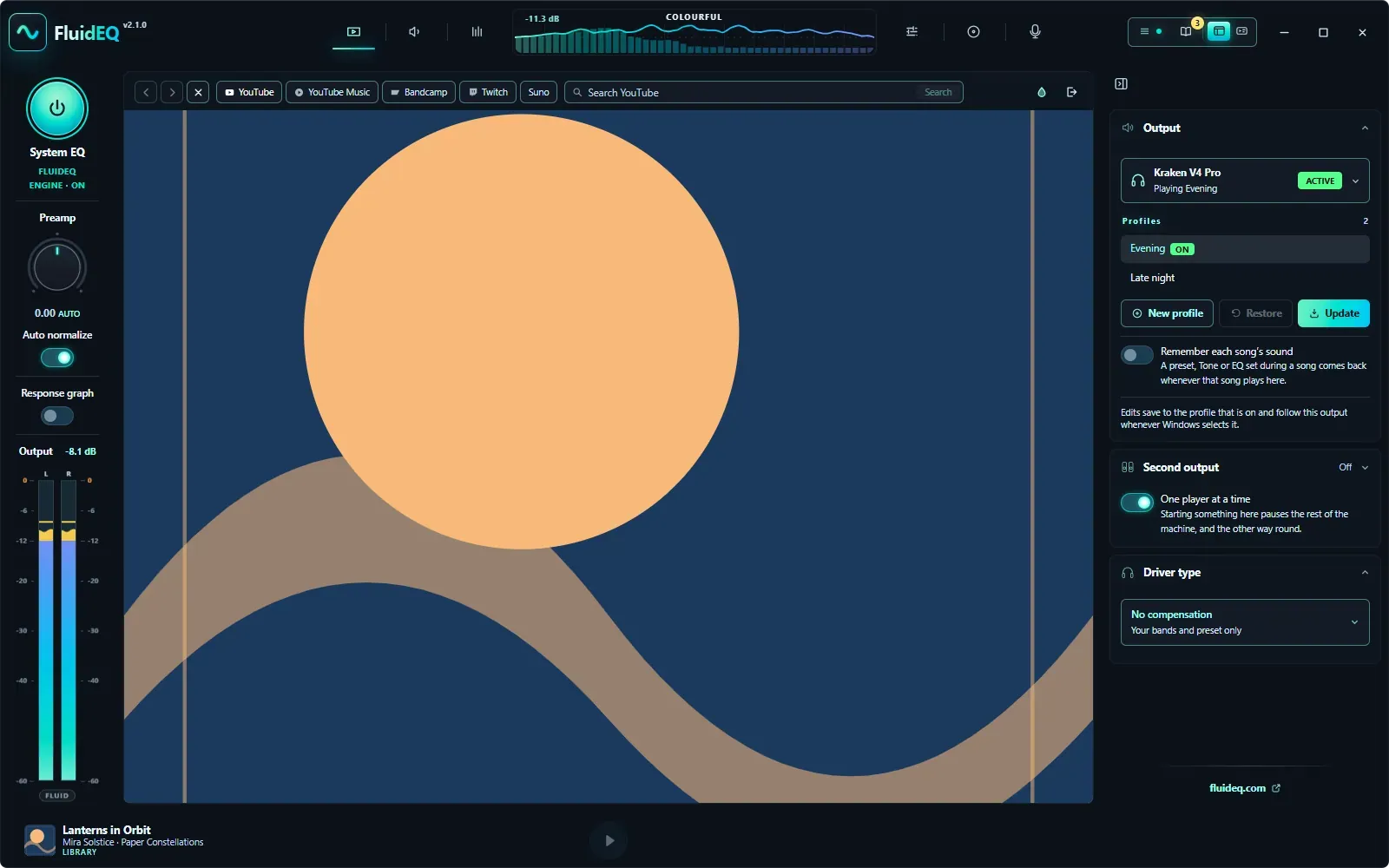
Online Media, inside FluidEQ
YouTube, YouTube Music, Bandcamp, Twitch and Suno, played inside FluidEQ with the same EQ and DSP.
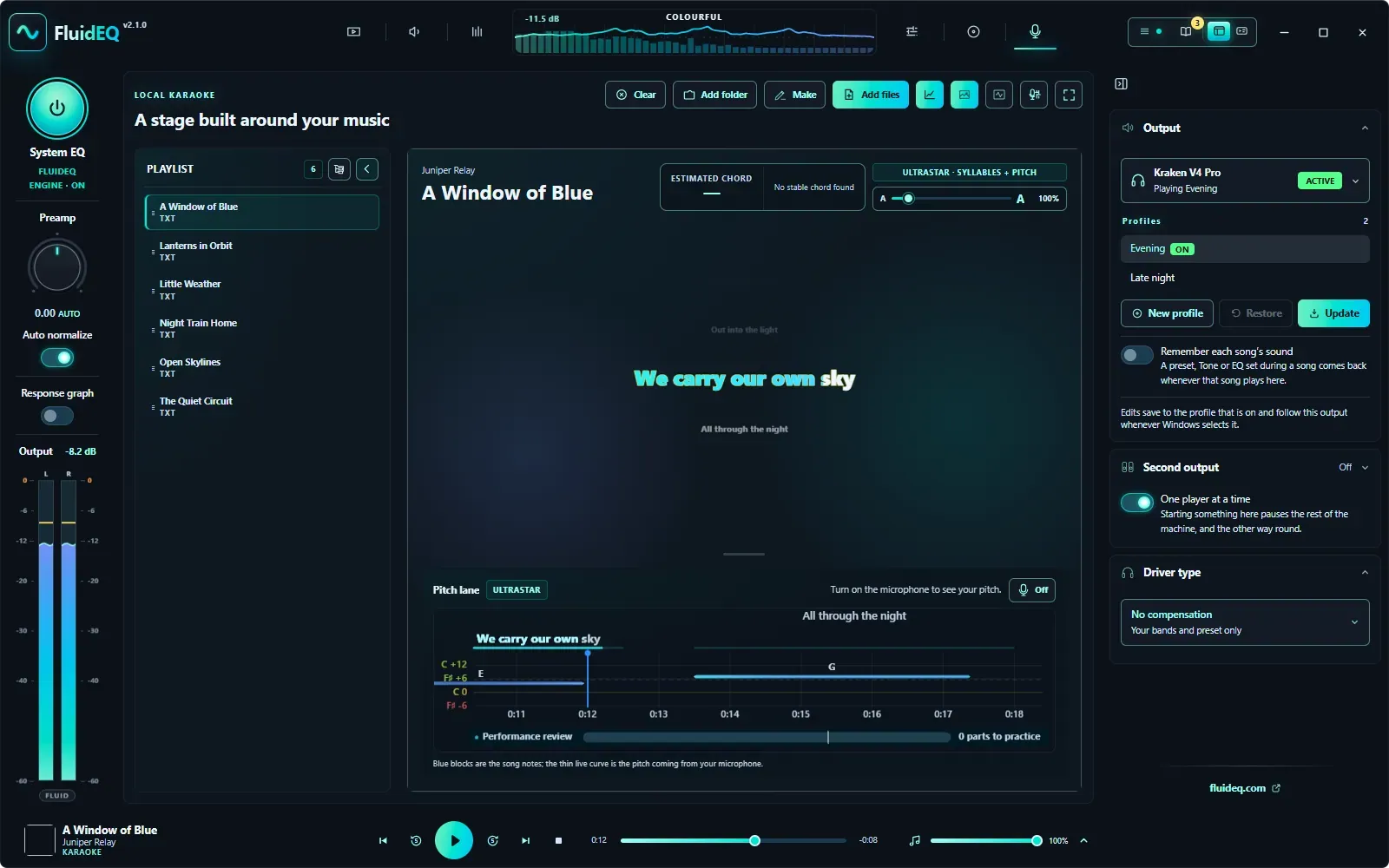
Karaoke, with a pitch lane
Timed lyrics set large, UltraStar syllables and pitch, and a lane that shows your voice against the melody.
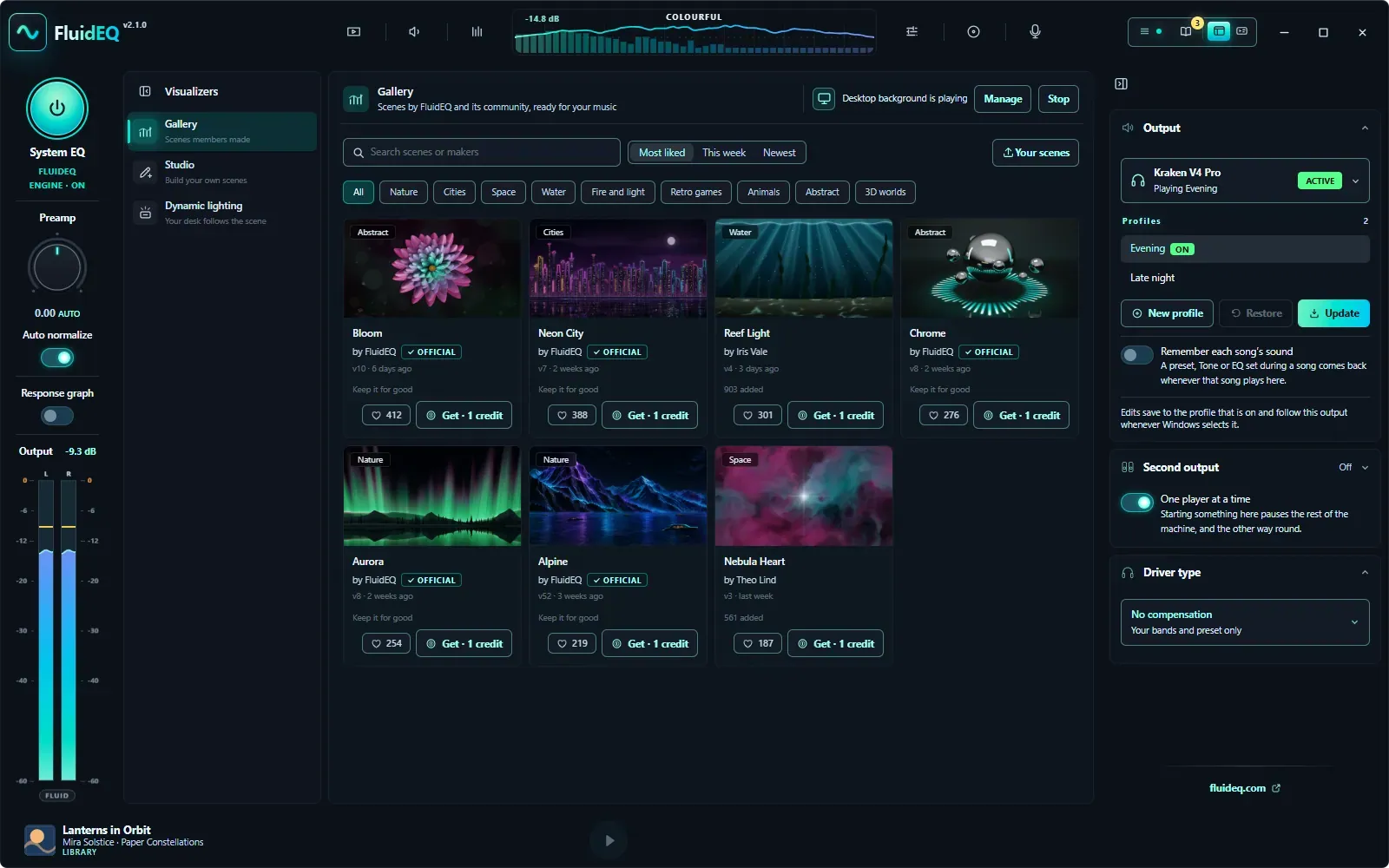
Visualizers, made for your music
Scenes by FluidEQ and its community move with your music, in the app and behind your desktop.
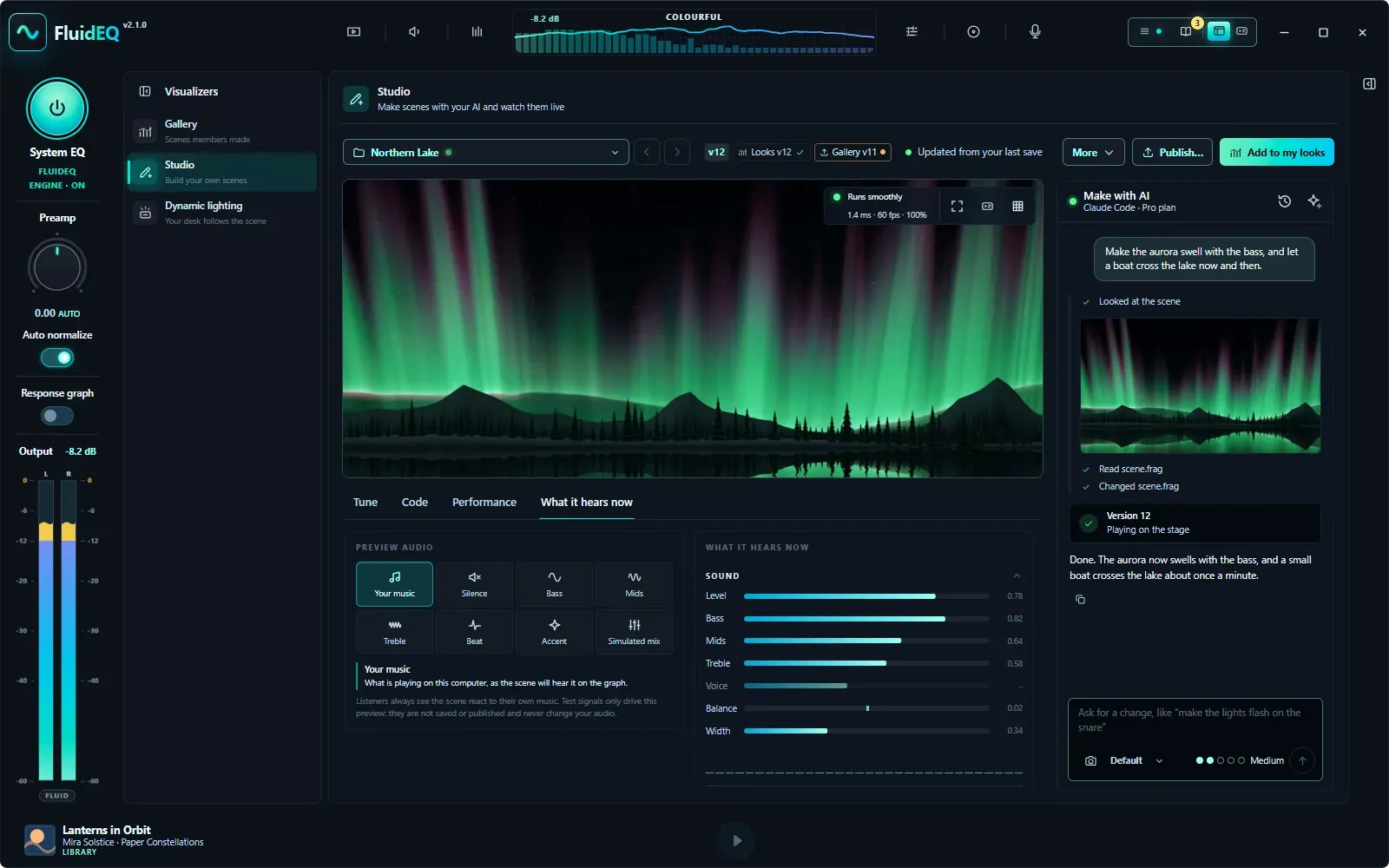
The Studio
Describe a scene, paste FluidEQ's prompt into your own AI assistant, and watch it play on your music as the files are saved.
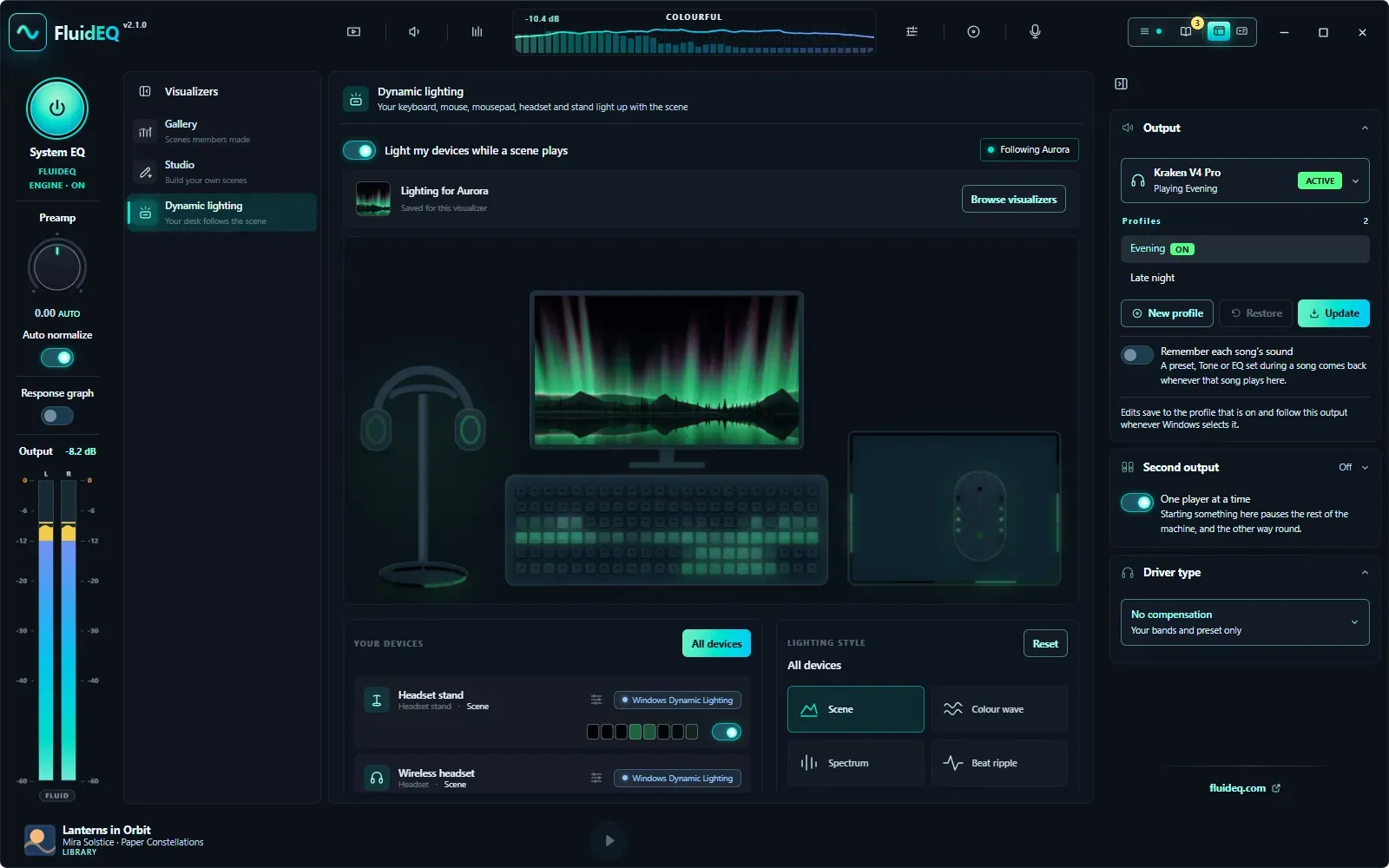
Dynamic Lighting, following the scene
Keyboard, mouse, mousepad, headset and stand take the colors of the scene on the graph.
New in v2.2.0
Headphones and speakers each keep their own EQ, preset, DSP rack and Room. Tune each ear on its own, soften a voice’s sharp S, share sound both ways across a whole group of computers, and keep the scenes you love for good.
EACH OUTPUT REMEMBERS
Headphones and speakers, each tuned its own way
ONE BAND, TWO EARS
Left + right in the band’s own menu
A SOFTER S
Sharp S sounds down, cymbals left alone
THE NEW PLAYER
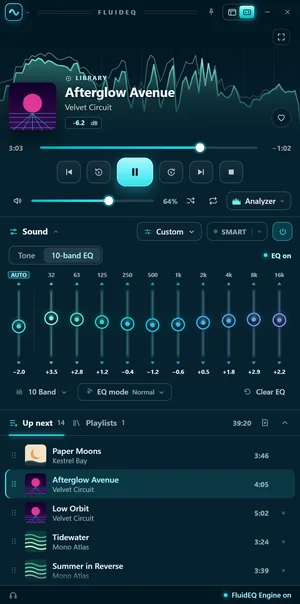
The compact player is all new: one column, with the visualizer glowing behind the song, the transport right under it, your EQ’s own bands, and Up next beside your playlists. Drop music anywhere on it to queue it. Turn the Tint and it takes your color — the keys, the faders, the seek bar and the song that’s playing — and with Colorful mode on, every fader gets a color of its own.

Cyan1 / 7
Visualizers
Create your own scenes for free in the Studio, or explore the optional gallery. One credit keeps a gallery scene on your graph, desktop and lights, with every update its maker publishes. Preview any scene for 10 seconds first.
FluidEQ Engine 1.24
2.1 brings FluidEQ Engine 1.24, which plays each ear’s own bands and the De-esser, and shows Live leveling’s output loudness. FluidEQ offers the update after it starts, with one Windows prompt; until then everything else plays as before.
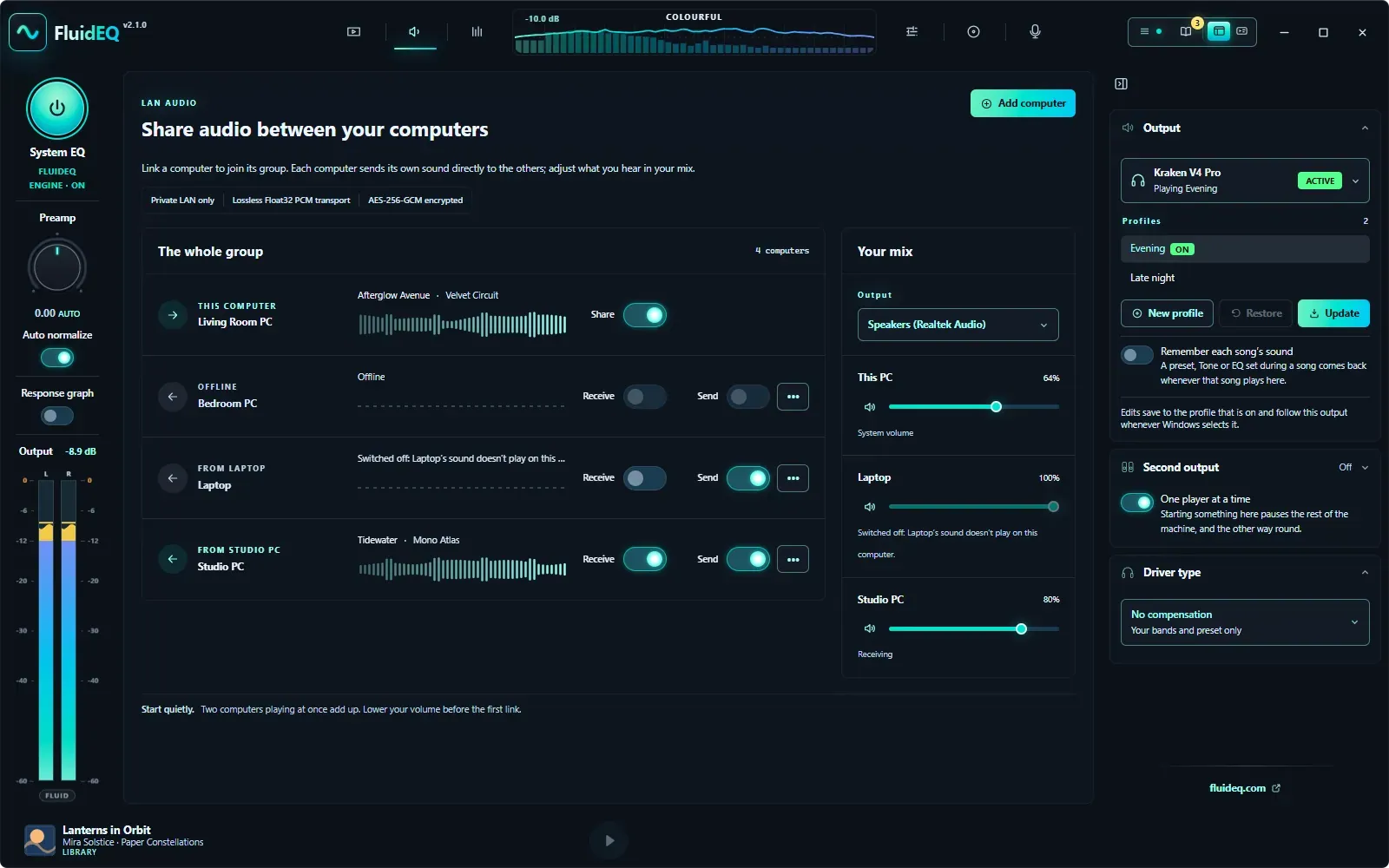
EVERY PC, BOTH WAYS
Hear every computer in the group, whichever one you sit at
THE EQ, IN NUMBERS
Labels on the curve, EQ mode beside it
CURVES OF YOUR OWN
Keep, name and reuse your own curves
A SOUND FOR EVERY SONG
Tune a song once, hear it that way every time
MAKE A SCENE BY ASKING
A chat beside the Studio’s stage
What FluidEQ does
An EQ for every app, a DSP rack, a player, karaoke, and visualizers that move with your music. Swipe through what FluidEQ does.
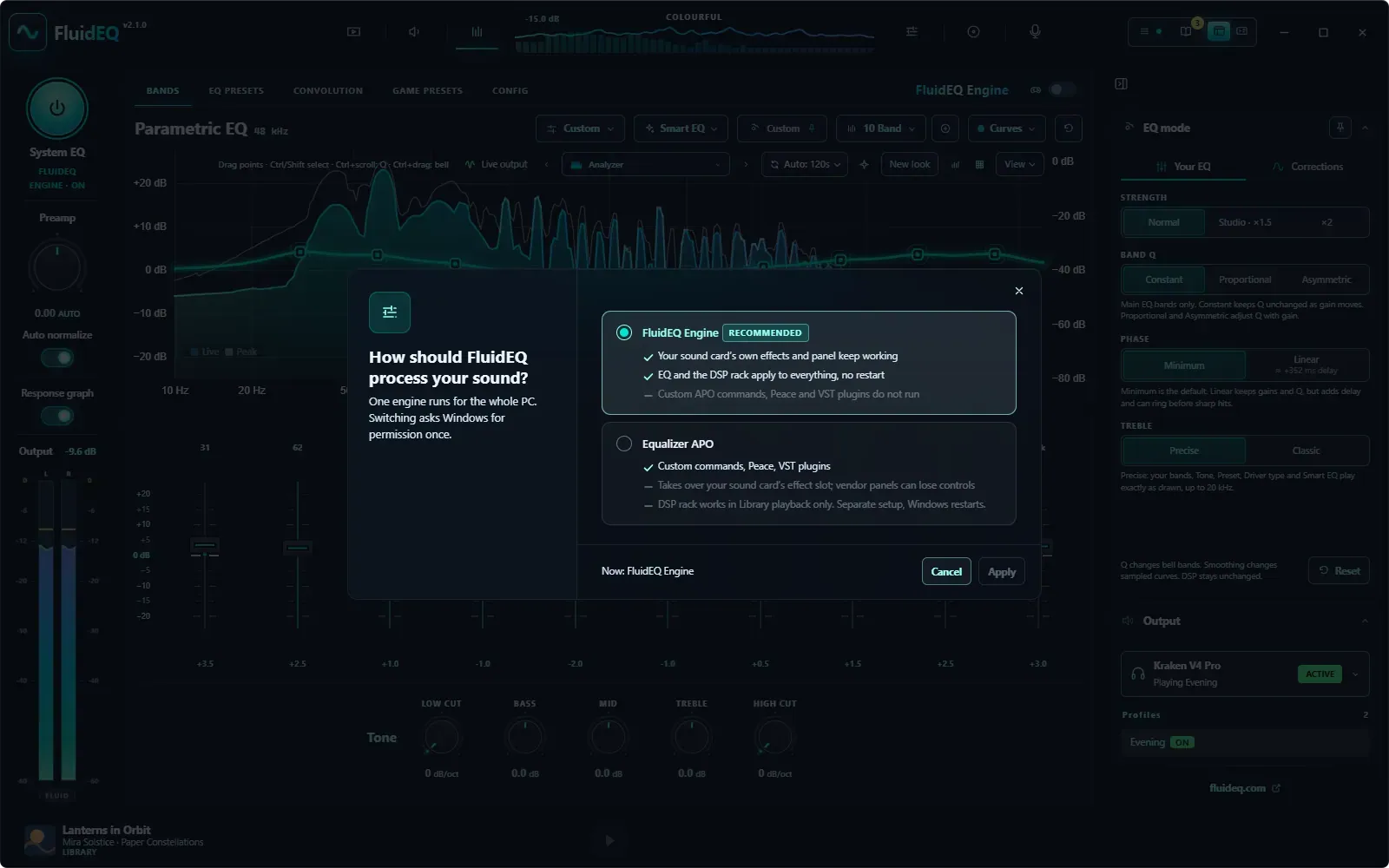 The FluidEQ EngineRuns inside Windows’ audio service, after your sound card’s effects. Switching takes one permission and no reboot.
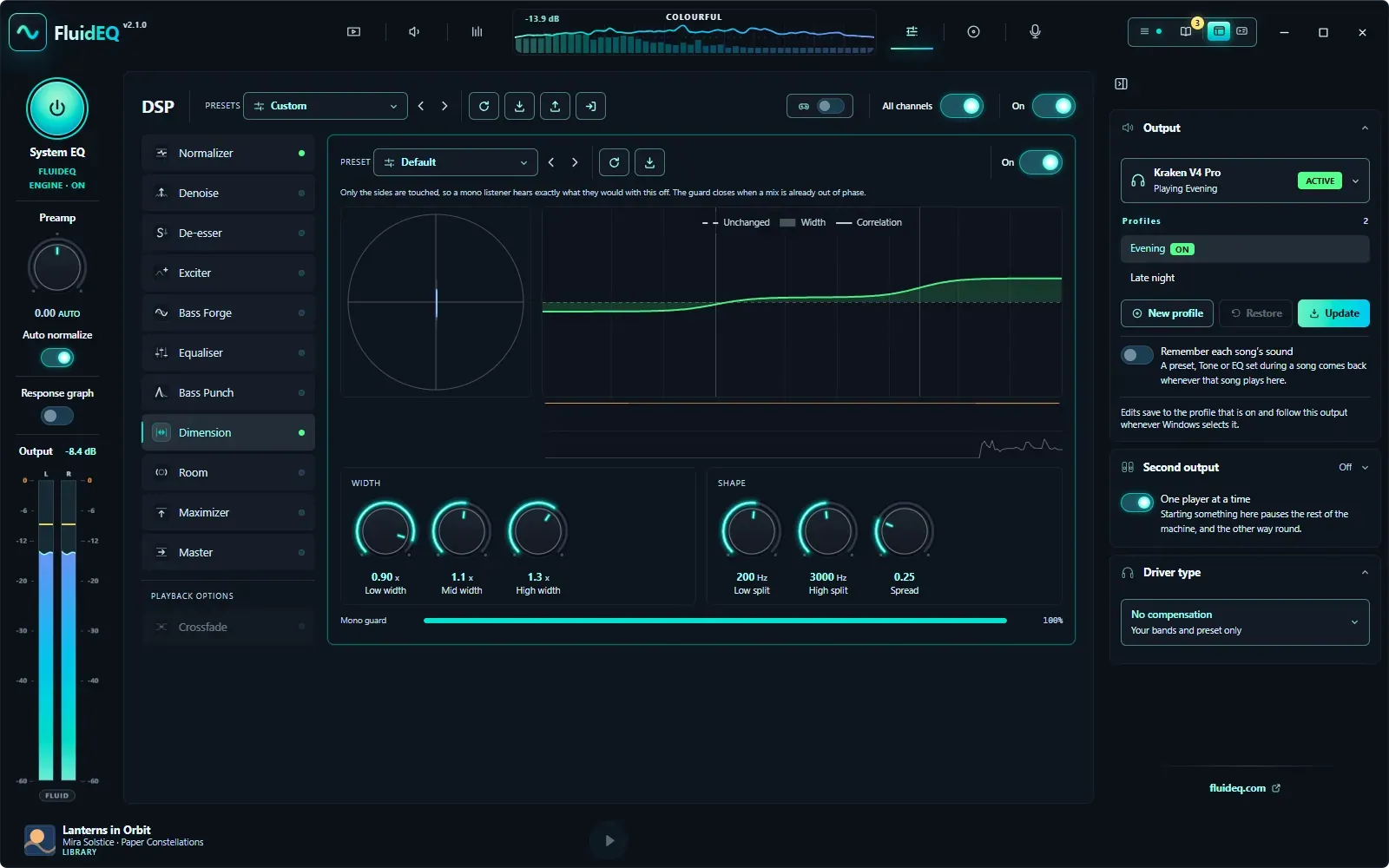 The DSP rack, for everything you hearNormalizer to Master on every app — games, browsers, streaming — under the FluidEQ Engine, with nothing playing in the Library.
VisualizersLiving scenes on your graphics card, where the bass, the beat and the treble each move something different.
The DSP rack, for everything you hearNormalizer to Master on every app — games, browsers, streaming — under the FluidEQ Engine, with nothing playing in the Library.
VisualizersLiving scenes on your graphics card, where the bass, the beat and the treble each move something different.
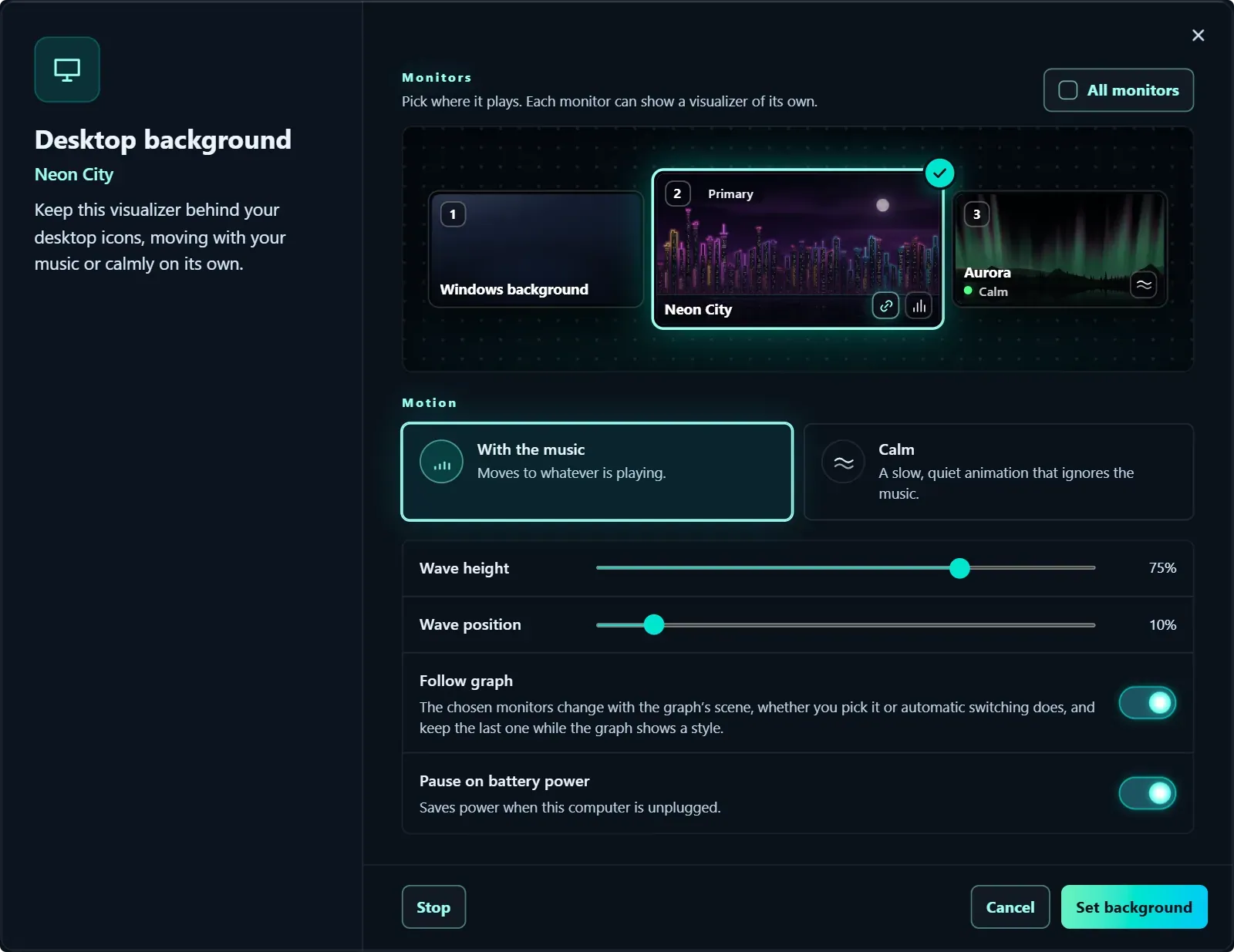 The desktop visualizerBehind your desktop icons, a different scene on each monitor, with the music or calmly on its own.
betaDynamic LightingYour keyboard, mouse, mousepad, headset and stand light up with the visualizer on the graph.
The StudioDescribe a scene to your own AI assistant and watch it come alive on your music as the files are saved.
The desktop visualizerBehind your desktop icons, a different scene on each monitor, with the music or calmly on its own.
betaDynamic LightingYour keyboard, mouse, mousepad, headset and stand light up with the visualizer on the graph.
The StudioDescribe a scene to your own AI assistant and watch it come alive on your music as the files are saved.
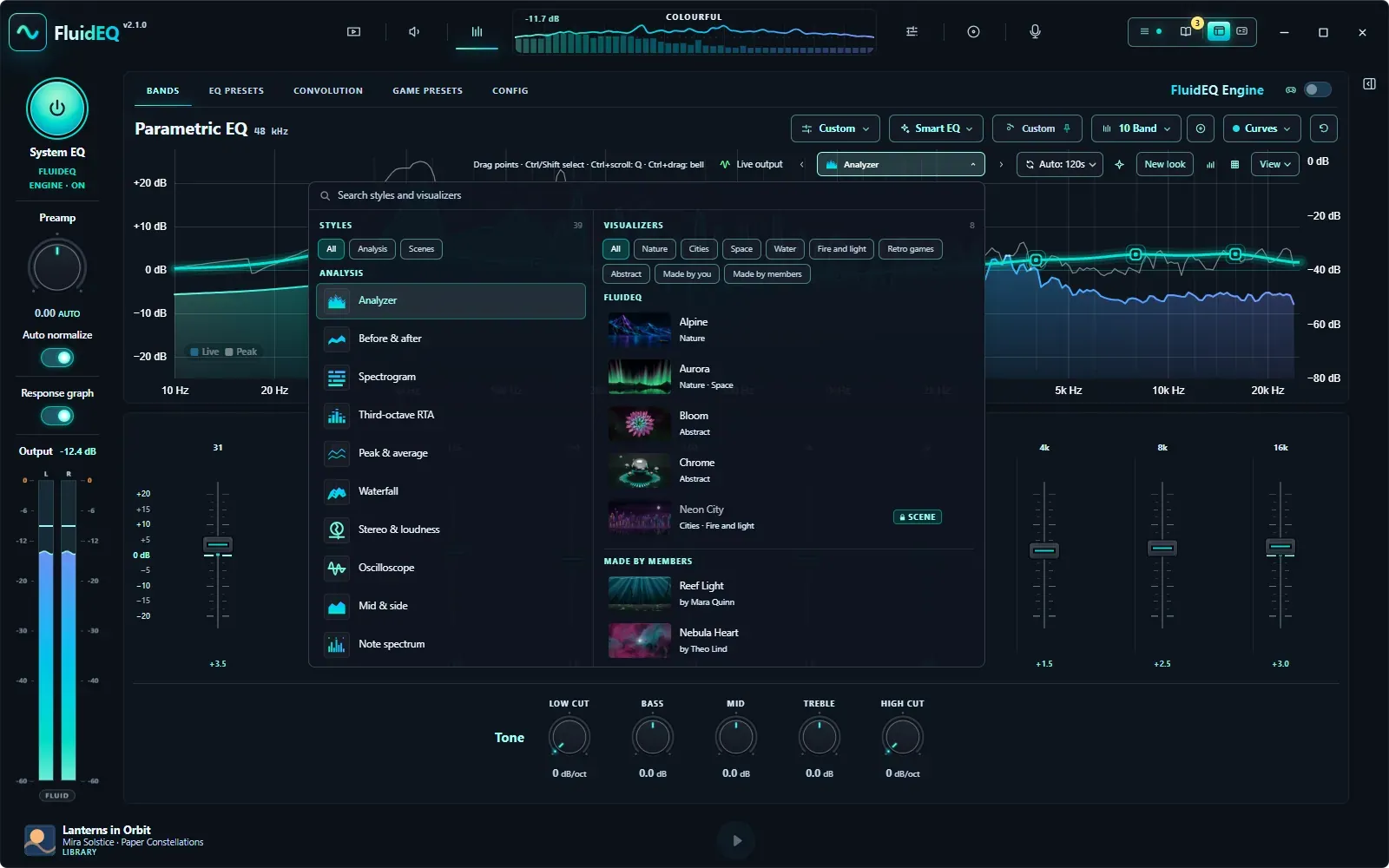 One picker for every lookThe free styles and the visualizer scenes in one searchable panel, with Auto switching every 10 seconds to 2 minutes.

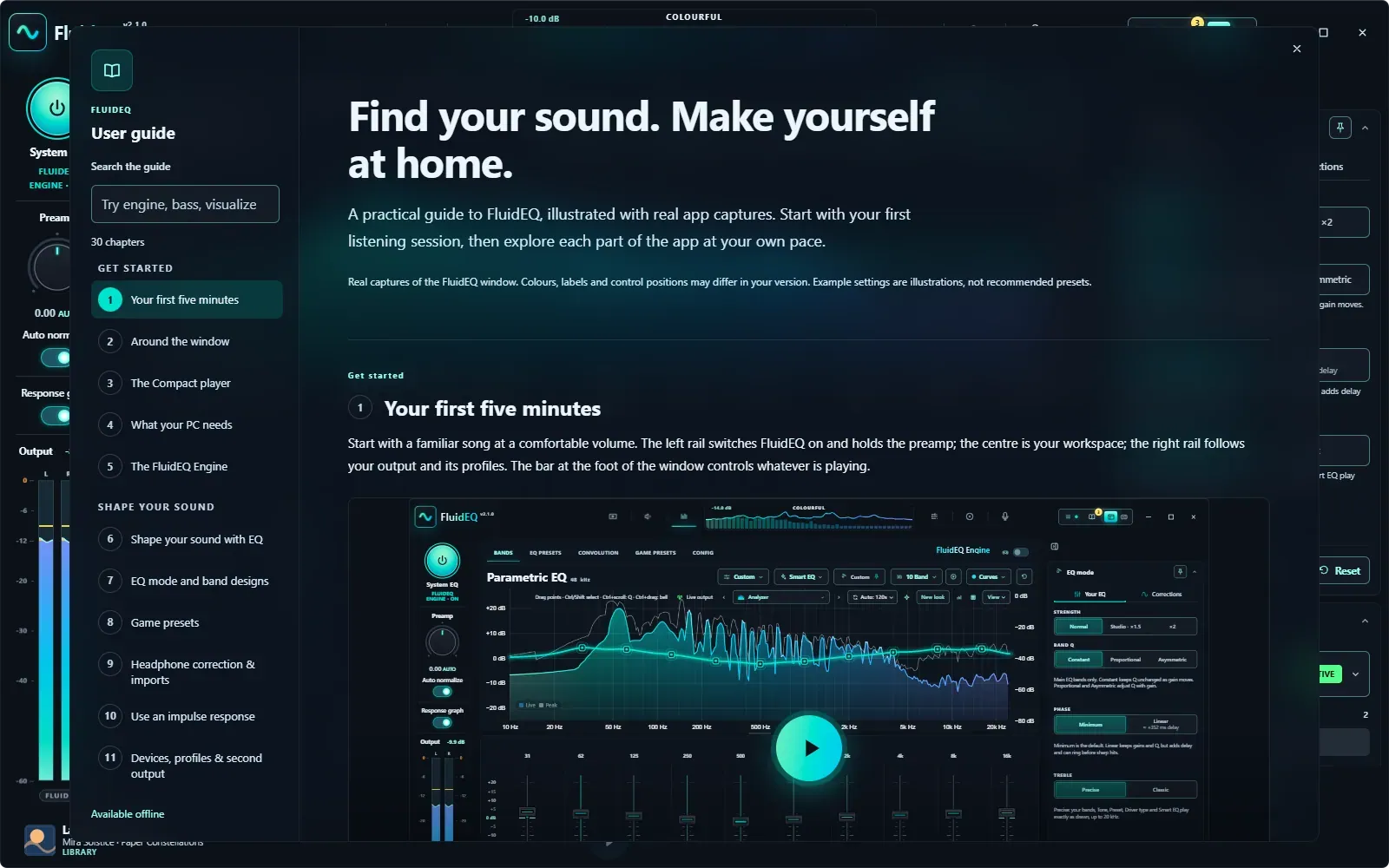 F1Get to know every corner of FluidEQ.Download the offline guide (English ZIP) ↓
Two outputs. Each with its own sound.Play your headset and speakers at the same time. Each output uses its own EQ, so the second device keeps its own tuning.
F1Get to know every corner of FluidEQ.Download the offline guide (English ZIP) ↓
Two outputs. Each with its own sound.Play your headset and speakers at the same time. Each output uses its own EQ, so the second device keeps its own tuning.
Your first five minutes
Start with a familiar song at a comfortable volume. The left rail switches FluidEQ on and holds the preamp; the center is your workspace; the right rail follows your output and its profiles. The bar at the foot of the window controls whatever is playing.
Visualizers FluidEQ
The visualizers are living scenes drawn on your graphics card. These are running in your browser right now, to the song from the demo video — the same scenes, through the same scene contract the app runs them in.

This browser cannot draw WebGL2, so the scenes stay still here. In FluidEQ they move with your music.
The gallery
The four above are from FluidEQ’s official collection, and new ones are on the way. Members make scenes of their own in the Studio and publish them, so the gallery keeps growing with its community — browse it by most liked, this week or newest.
Official scenes Made by members
Highlighted: the categories playing above.
Browse them in Visualizers → Gallery, watch any scene for 10 seconds with a free account, and keep the ones you like for one credit each.
The window can take a visualizer’s colors or its light, and some bring birds, petals or stars that drift gently around the app — what this page is doing now.
Tell your own AI assistant what you want, paste FluidEQ’s prompt, and the scene plays on your music as the files are saved. Projects, a live code pane, test signals, pictures and scene settings share one page.
The Studio is free for every account: make as many scenes as you like, publish them to the gallery, share them as files — or open one of FluidEQ’s own scenes to see how it is made. Once a scene you publish is approved, it plays free for you everywhere.
A different scene on each monitor, moving with the music or calmly on its own. It pauses for full-screen apps, a locked PC and battery power, and comes back the next time FluidEQ starts.
Keyboard, mouse, mousepad, headset and stand follow the visualizer on the graph, through Windows Dynamic Lighting and Razer Chroma. Choose Scene, Colour wave, Spectrum or Beat ripple for each visualizer, tune each device, and watch a live preview of your own desk.
Scenes are bought inside FluidEQ
Visualizers See it in motion
Everything in the Visualizers tab, in four and a half minutes: the gallery, the Studio from an idea to a published scene, Dynamic lighting and the desktop visualizer.
Visualizers Make it with your AI
The Studio turns a description into a visualizer. Your own AI assistant writes the scene in a project folder, and FluidEQ plays each version on your music the moment it is saved. The Studio is free for every account.
Give it a name. FluidEQ makes its folder, with a scene that already moves.
What it shows, and what moves with the beat, the bass or the treble. A photo of yours can come alive too.
It tells your AI how FluidEQ scenes are made, with your idea at the end. Every file it saves plays on the stage right away.
Any assistant that works on files: Claude, Cursor, Codex, Copilot. With a chat instead, save the files it gives you in this folder.
Anyone signed in can find it in Visualizers and watch it for 10 seconds, and one credit keeps it in their looks for good.
Studio
How to start Open Visualizers and choose Studio in its rail.
The FluidEQ Engine
FluidEQ’s own audio engine runs inside Windows’ audio service, after your sound card’s effects — so games, browsers and streaming apps all pass through your EQ and the whole DSP rack, and the maker’s panel keeps working.
Switch any time from the actions menu. Updating FluidEQ keeps the engine you already have.
Features
Online Media, EQ, DSP, Library and Karaoke share one transport, one volume and one clear signal story. EQ keeps its bands, headphone corrections, presets and convolution together; under the FluidEQ Engine the DSP rack works on every app.
Online video with the live response underneath
Play online video inside FluidEQ while the response graph and the live spectrum stay in view, and one player at a time keeps Library, Karaoke and Online Media from talking over each other.
1active player at a time
Up to 128 bands, every filter type
Headphone corrections from 6,229 models, convolution and your own bands, each a layer with its own switch and strength, under a preset that sets the whole chain in one pick. Also: EQ mode, band designs, and switching a band off without losing it. Find your headphones
128bands per output
A rack of 11 stages for everything you hear
Normalizer, Denoise, De-esser, Exciter, Bass Forge, Equaliser, Bass Punch, Dimension, Room, Maximizer and Master. Under the FluidEQ Engine the rack works on everything you hear; under Equalizer APO, on FluidEQ’s own player.
117DSP EQ presets
Your own music, played in the app
Browse by album, artist, song or video, and turn whatever you are looking at into the queue. The next song starts even while FluidEQ is minimized, and its taskbar button carries Previous, Play/Pause and Next.
5ways to browse
Timed lyrics, multilingual sheets, pitch lane and chords
Timed lyrics, a pitch lane and estimated chords in the player; the Karaoke Maker splits a song into voice and backing and lines the lyrics up on your machine.
3lyric formats
Living scenes that move with your music
Living scenes drawn on your graphics card, where the bass, the beat and the treble each move something different. One searchable picker holds the free styles and the scenes, and the window can take a scene’s colors or its light.
3parts of the music each scene follows
No virtual audio device, no telemetry, and no account needed to use it.

The person behind FluidEQ
I’m Ivan Carmenates Garcia. I belong to the in-between era: old enough to have written Z80 machine language by hand, young enough to still ship software today.
My father traveled across provinces to find his kid a better computer. That machine opened a door I never stopped walking through.
MSX-era BASIC led to hand-written Z80 code, then to a lifetime of asking how complex software could feel clear and immediate.
Today I’m a developer, a father of two, and the person building FluidEQ. The quiet hours after family time are when filters are tuned, bugs are chased, and the next workspace takes shape.
One coffee is roughly one late night of building. It helps keep FluidEQ free, local, maintained, and moving forward.
A hidden reward
Tap the pet on the beat. In FluidEQ the game hears the percussion in your own audio; here, reach ×10 and this page turns colorful too.
In FluidEQ itself, Colorful mode is one click away in the What’s new tour — no ×10 required.
FluidEQ / v2.2.0
Your EQ, audio engines, DSP rack, players and creative tools are free to download and use. No subscription, no paid app edition.
FluidEQWindows 10 & 11
$0free, GPL-3.0-or-later
Want a different look? Extra gallery scenes are optional and use credits, with 3 free for a confirmed account. The app and the Studio stay free. About scenes and credits →


