FluidEQ doesn't play your music; Windows does. To change the sound of everything the PC plays, FluidEQ puts an engine inside Windows' own audio. You choose which one, and one runs at a time.
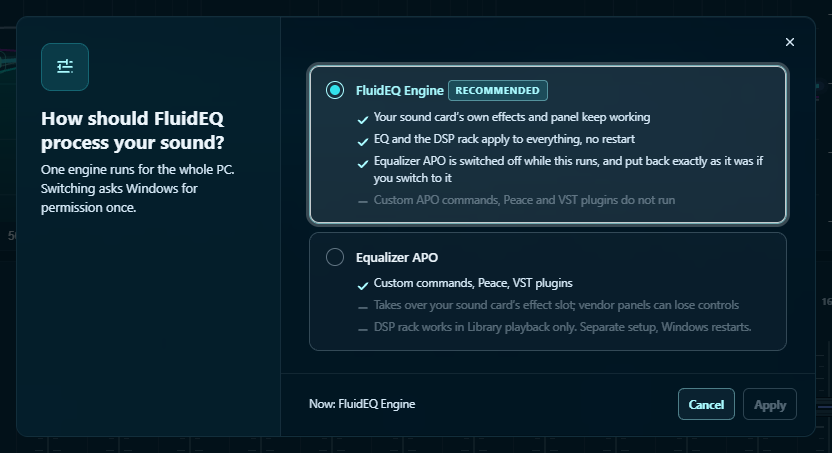
The FluidEQ Engine (recommended)
- Your sound card's own effects and its control panel keep working.
- Your EQ and the DSP rack, the Room and the Game filter reach every app.
- Each output keeps its own sound: headphones and speakers can be tuned completely differently.
- It steps aside the moment FluidEQ quits, so an EQ never outlives the app.
- While it runs, Equalizer APO is switched off and put back exactly as it was if you switch to it.
Equalizer APO
- The open-source engine FluidEQ began on. It still ships inside the installer.
- Choose it for custom APO commands, Peace or VST plugins.
- It takes over your sound card's effect slot, so a vendor's panel can lose controls, and the DSP rack only plays in FluidEQ's Library.
Switching
- Open the actions menu (≡) and press the engine card at the top.
- Pick an engine and press Apply.
- Windows asks for permission once, and the sound pauses for a few seconds while Windows audio restarts.
When an output says OFF, or nothing changes
- OFF on an output: press Enable on its notice.
- A notice says the engine isn't running: press Restart Windows audio.
- Windows' Audio enhancements switched off for an output means Windows loads no engine there at all. FluidEQ says so and opens Windows' Sound page for you.
- Still nothing, with everything looking right: Windows may be playing past the engine. The notice offers to move it to a place your sound card uses, for one permission prompt and a second of silence.
When an update brings a newer engine, a notice offers Update engine. An app update never swaps the engine on its own.
More in the app: Help → The FluidEQ Engine and When something sounds wrong. Still stuck: Something wrong? Where to report it.